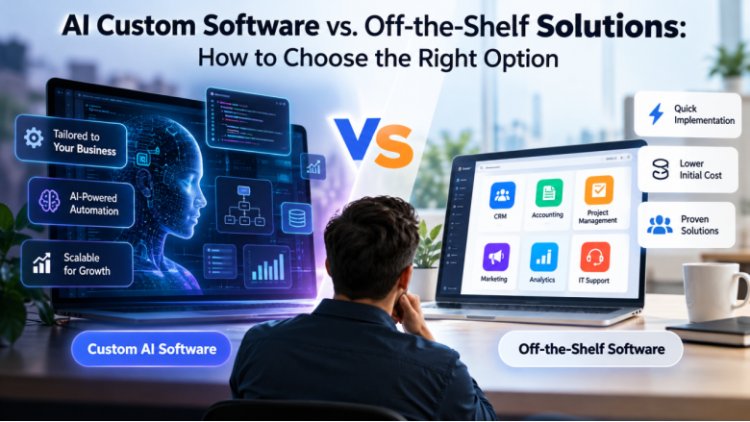
AI Custom Software vs. Off-the-Shelf Solutions: How to Choose the Right Option
Artificial intelligence (AI) adds another layer to this decision. It can help businesses study data, recognize patterns, and automate routine tasks. However, adding AI is useful only when it improves a process or helps people make better decisions.
Imagine running a business where employees spend hours moving information between spreadsheets, answering the same customer questions, or preparing reports by hand. You know technology could make these tasks easier, but choosing the right solution is not always simple.
One option is to buy software that is ready to use. Another is to build a system around the way your business operates. Both approaches can work well, but the wrong choice may lead to wasted money, extra work, and tools that do not solve the real problem.
Artificial intelligence (AI) adds another layer to this decision. It can help businesses study data, recognize patterns, and automate routine tasks. However, adding AI is useful only when it improves a process or helps people make better decisions.
So, how should a business choose between custom-built and ready-made software? The answer starts with understanding what each option can do, what it costs, and how well it fits your plans.
Understanding Custom Software and Ready-Made Solutions
Before comparing the two options, it helps to understand how they work in everyday business settings.
What Is Custom AI Software?
Custom AI software is created to solve a particular problem or support a specific business process. Its design depends on the company's goals, the data it can use, and the tasks it needs to improve.

Consider a furniture manufacturer that receives orders from several sales channels. Each order may contain different product sizes, materials, delivery dates, and customer requests. Staff might spend hours checking details and planning production.
A tailored system could bring this information together and help the team estimate material needs, identify scheduling conflicts, and prepare production plans. AI could support these tasks when suitable data is available.
Other examples include:
● A retailer predicting which products may sell faster during a holiday season.
● A customer support team sorting incoming requests by topic and urgency.
● A logistics company estimating delivery delays using traffic and order data.
● A financial team identifying unusual transactions for further review.
The main advantage is that the system can be designed around the problem. The business does not have to depend entirely on the features offered by a general-purpose product.
However, custom development requires planning and ongoing care. The system needs testing, updates, security checks, and regular reviews to make sure it continues to meet business needs.
What Is Off-the-Shelf Software?
Off-the-shelf software is a product that has already been developed for a wide range of users. Businesses can purchase it, subscribe to it, and configure its available features.
Common examples include accounting applications, project management tools, email marketing platforms, and customer relationship management systems.
Suppose a small business wants to track invoices and payment dates. It probably does not need a new application built from scratch. An existing accounting product may already provide everything required.
Ready-made software can also include AI features. Some tools can summarize documents, draft responses, or prepare reports without requiring a separate AI development project.
The main benefit is convenience. The business can start with an existing product instead of managing the entire development process.
The limitation is that the product may not support every requirement. If its features or integrations do not match the company's processes, employees may need to change how they work.
Custom Software vs. Off-the-Shelf Software: What Really Matters?
The decision should not be based on price alone. A useful comparison considers the cost, time, flexibility, security, and value each option can deliver.
1. Initial Cost and Total Ownership Cost
Ready-made software often requires less money at the beginning. A business may pay a monthly subscription or an annual license rather than fund a full development project.
However, the subscription is only part of the total cost. Additional users, premium features, data storage, integrations, and training may increase expenses over time.
Custom software usually requires a larger initial investment. The business must pay for requirements gathering, design, development, testing, and deployment. Hosting, maintenance, and future improvements may create additional costs.
A fair comparison should include the full cost of using each option over several years.
For example, a company may spend less on a ready-made tool but still pay employees to move data between separate applications. A more integrated solution might reduce that manual work. Whether the investment pays off depends on the development cost and the actual time saved.
Practical tip: Estimate the total cost over three years, including subscriptions, staff time, maintenance, and upgrades. Use realistic figures instead of assuming that custom software will automatically save money.
2. Flexibility and Control
Ready-made products provide features that work for many customers. This is helpful when a business follows common processes and does not need major changes.
Custom software offers more control over how tasks are completed. A business can choose which information to collect, how users move through the system, and which rules the software follows.
For instance, a wholesale company may offer different prices based on customer type, order size, and delivery location. If a standard product cannot handle these rules, employees may need to calculate prices manually.
A tailored application could bring these rules into one process.
Still, flexibility has a cost. Every extra feature takes time to build and maintain. Businesses should focus on the functions that solve real problems instead of trying to include every possible feature.
3. Implementation Time
Ready-made software is generally faster to introduce because its main features already exist. The business may only need to configure the product, transfer data, and train employees.
Custom software requires more preparation. The development team must understand the requirements, design the system, build its features, and test it before launch.
The timeline depends on the project's size and complexity. A small application may take weeks or months, while a large platform with several integrations can take considerably longer.
However, speed should not be measured only by how quickly the software launches. A ready-made product that creates daily workarounds may cause problems for years.
Businesses should compare the time needed to launch with the time they expect to save after implementation.
4. Integration With Existing Systems
Most companies use several tools to manage sales, payments, customers, stock, and reporting. These tools need to exchange information correctly.
When they do not connect well, employees may enter the same details into multiple systems. This creates extra work and increases the chance of mistakes.
Many ready-made products connect with popular business applications. Before choosing one, check whether it supports your current tools and whether the required integrations cost extra.
Custom software can be designed to connect with specific systems. However, successful integration depends on available APIs, access permissions, data formats, and the quality of the existing applications.
A good integration plan should explain which information moves between systems, how often it updates, and what happens if a connection fails.
5. Security and Data Privacy
Security deserves attention regardless of which option you choose.
Ready-made software may benefit from regular updates and dedicated security teams. However, businesses still need to check the provider's security practices, privacy terms, backup options, and access controls.
Custom software gives a business more control over how its data is handled. That control does not make it secure by default. Poor design, weak passwords, outdated components, or missing updates can create serious risks.
AI adds further questions. Businesses should understand what happens to the information they submit to an AI service. They should also check whether the provider stores that information or uses it to improve its models.
For sensitive data, access should be limited to authorized users. Important decisions should have suitable review procedures, especially when an AI system can make mistakes.
6. Scalability and Future Growth
A solution that works for ten employees may struggle when the business grows to hundreds of users. More customers, larger datasets, and new services can place extra demands on software.
Some ready-made products offer higher plans, additional storage, and more advanced features. These upgrades may be enough for a growing company.
Custom software can be designed around expected growth, but the development team must plan for performance, storage, security, and future changes.
Before making a choice, ask what the business is likely to need over the next two or three years. Consider expected user numbers, transaction volumes, new locations, and changes in daily operations.
Planning for realistic growth can help prevent an expensive replacement later.
When Should a Business Invest in Custom AI Software?
Custom development may be worth considering when an important business problem cannot be solved well with available products.
Here are some situations where it may make sense.
Your processes are unusual. Your team follows rules or workflows that standard products cannot support.
Your data needs special treatment. You need to combine information from several sources or analyze data in a way existing tools cannot handle.
Manual work is becoming expensive. Employees spend too much time repeating tasks that could be automated safely.
Your product needs a unique feature. Your competitive advantage depends on a function that general-purpose software does not offer.
Your current tools limit growth. The cost or complexity of working around existing limitations keeps increasing.
For example, a food distributor may need to estimate product demand while accounting for shelf life, seasonal changes, and delivery schedules. A general forecasting tool might not include all these factors.
A tailored system could be designed to consider the relevant data and help planners make better decisions. Its performance would still need to be tested against real results.
Businesses exploring Custom AI Development Services should first identify the problem, assess their data, and define how success will be measured. This prevents spending money on technology that looks impressive but delivers little practical value.
When Is Off-the-Shelf Software the Better Choice?
Ready-made software is often the better option when your requirements are common and the available features already meet your needs.
It may be suitable for a business that wants to:
● Track leads and customer conversations.
● Prepare invoices and monitor payments.
● Manage tasks and project deadlines.
● Schedule social media content.
● Create routine reports.
● Organize employee records.
These tasks do not always justify a custom development project.
Ready-made products can also help startups test a business idea. Instead of spending months building an entire platform, founders can use existing tools to understand customer needs and improve their business model.
Before choosing a product, check its limitations. Review the pricing, available integrations, data export options, security features, and support terms.
If the product meets your current needs and leaves enough room for growth, buying it may be the most sensible decision.
A Step-by-Step Method to Choose the Right Option
A simple decision process can help you avoid unnecessary spending and choose software based on facts rather than assumptions.
Step 1: Identify the Problem
Start with the task you want to improve.
Is your team spending too much time on data entry? Are customer requests being missed? Do separate applications make reporting difficult?
Speak with employees who perform these tasks every day. They can often explain where delays and errors occur.
Step 2: Define Measurable Goals
Decide what improvement would make the investment worthwhile.
You might want to reduce report preparation time, improve order accuracy, or answer customer requests more quickly.
Write down the current result and the target you hope to achieve. This will help you evaluate the software after launch.
Step 3: Review Existing Products
Research products that address the problem. Compare their features, prices, integration options, and security policies.
Test a product with realistic tasks whenever possible. A demonstration may show its best features, but daily use can reveal limitations that are easy to miss.
Step 4: Calculate the Full Cost
Include subscriptions, licenses, training, data migration, integration work, maintenance, and future upgrades.
For a custom project, ask for a proposal that explains the scope, delivery stages, responsibilities, and ongoing support.
Compare the options over the same period so that the results are meaningful.
Step 5: Test Before Expanding
Avoid committing to a large project before confirming that the approach works.
You can start with a trial of ready-made software or build a small minimum viable product (MVP). An MVP contains the essential features needed to test an idea.
Collect feedback, measure the results, and improve the solution before investing in more features.
Can Businesses Combine Both Options?
Yes. A business can use ready-made software for standard tasks and custom applications for specialized requirements.
For example, a company might keep its existing accounting platform while developing a separate tool to manage a unique approval process. It could also connect an AI assistant to its internal knowledge base while continuing to use a standard customer support system.
This approach can reduce development costs and avoid rebuilding features that already work well.
However, combining products requires careful planning. Data must move between systems correctly, access permissions must be managed, and employees should understand which tool is responsible for each task.
A hybrid approach is most useful when every system has a clear role and the connections between them are reliable.
Common Mistakes to Avoid
Even a well-chosen product can disappoint when the business overlooks basic planning.
Choosing Only by Price
A cheap product may lack important features or become expensive as more users join. Compare the total cost and the value the software provides.
Adding AI Without a Clear Purpose
AI is not the answer to every problem. A simple rule or standard automation may be easier to maintain and less expensive.
Use AI when it offers a meaningful benefit that can be tested.
Building Too Many Features
Large projects can become difficult to manage when every department requests additional functions. Start with the main problem and add features when there is a clear need.
Ignoring Employee Feedback
Employees are the people who will use the software. Involve them early, test the design with them, and provide suitable training.
Forgetting Ongoing Support
Software needs updates, monitoring, and maintenance. Decide who will handle these tasks before the product goes live.
Skipping Security Reviews
Check data access, backups, privacy terms, and security controls before adopting a product or launching a new application.
Avoiding these mistakes can help businesses control costs and focus on improvements that matter.
Final Thoughts
Choosing software is a business decision, not simply a technical one. The right solution should make important tasks easier, support your team, and deliver value over time.
Ready-made products are often ideal for common needs. Custom software can be useful when existing tools cannot support a critical process. In some cases, combining both approaches offers the best balance.
Start by defining the problem, comparing available products, and setting clear goals. Consider the full cost, data security, integration needs, and future growth before making a commitment.
When your requirements go beyond standard features, experienced Software Development Services providers can help assess the options and plan a solution around your business goals.
The aim is not to choose the most advanced technology. It is to choose the technology that solves the right problem.
Frequently Asked Questions (FAQs)
1. What is the difference between custom software and off-the-shelf software?
Custom software is developed for a specific business or purpose. Off-the-shelf software is designed for a wider audience and comes with features that are already available.
Custom software offers greater control over how a system works. Ready-made products are usually quicker to set up and may cost less initially.
The right choice depends on your requirements, budget, and plans for growth.
2. Is custom AI software suitable for small businesses?
Yes, it can be suitable when it solves an important problem and the expected benefits justify the cost.
Small businesses should first check whether an existing product can do the job. If it cannot support an essential process, a smaller custom solution may be worth exploring.
Starting with a limited set of features can help control costs and test the idea before expanding it.
3. How much does custom software development cost?
The cost depends on the project's features, complexity, integrations, security needs, and development time.
A simple application generally requires less work than a large platform with several connected systems and advanced AI functions.
Ask for a detailed estimate covering development, testing, deployment, hosting, and maintenance. This makes it easier to understand the total investment.
4. How long does it take to build custom software?
The timeline depends on the size of the project and the work required.
A small application may take weeks or months, while a complex system may require a longer development period. Data preparation, testing, and integration can also affect the schedule.
A clear plan and a limited first release can help the team manage progress.
5. Can ready-made software include AI features?
Yes. Many existing products offer AI features for reporting, writing assistance, customer support, and data analysis.
These features can be useful when they meet your requirements without extra development.
Check what the product can actually do, whether additional fees apply, and how it handles your business data.
6. Which option is more affordable over time?
It depends on how the software is used.
Ready-made products may have lower starting costs, but subscriptions and add-ons can increase over time. Custom software usually requires a larger initial investment but may reduce manual work or support specialized operations.
Compare the full cost over several years and include the time employees spend using the system.
7. Is custom software always more secure?
No. Security depends on how the system is designed, configured, maintained, and monitored.
Custom software offers more control over data handling, but it still needs security testing and regular updates. Ready-made products may provide managed security features, but businesses should review the provider's policies.
Both options require suitable access controls, backups, and privacy practices.
What's Your Reaction?